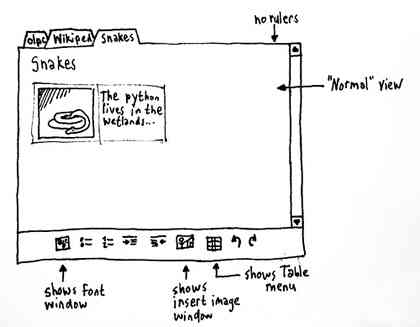
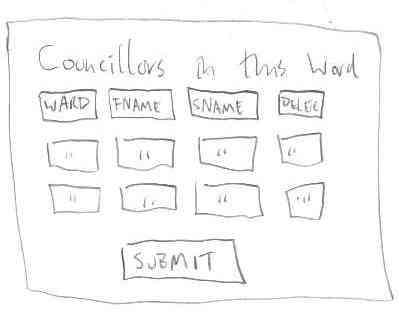
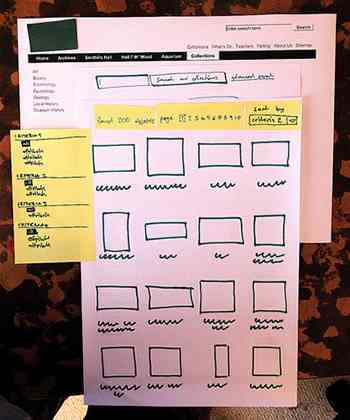
People have been sketching user interfaces since the birth of the web but the sketches usually stay locked away in old notebooks and discarded bar napkins in Austin, Texas. Many of the websites we use started out as scrawlings, and with people like Jakob Nielsen and Bill Buxton spreading the gospel of faster, cheaper paper prototypes, “next year’s Twitter” may already exist on paper.
We don’t usually get to see this handmade stage of the web, but some folks have been thoughtful/narcissistic enough to upload photos of their UI sketches, and I find them fascinating.
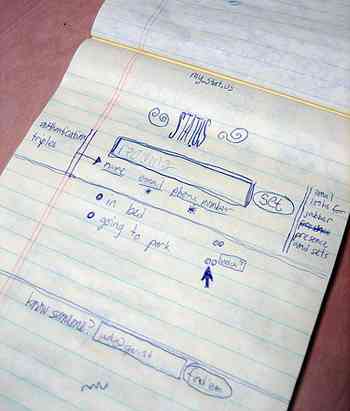
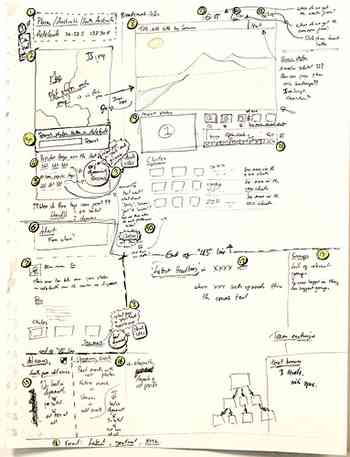
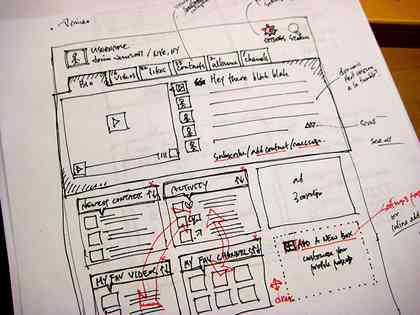
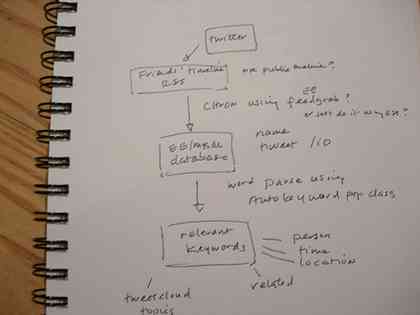
Many UI designers sketch with Sharpies but Sox prefers Staedtler pens, which are from Germany and built for engineers. He has a vast portfolio of UI sketches on Flickr.


Finally, some high-intensity paper-prototyping action via YouTube:
55 Comments
Nice post. Found via Digg and dugg!
It’s a real shame that many web ‘designers’ don’t even think of sketching these days.
Sketching is my absolute favorite part of any project. This is great, thanks for sharing it.
Quite nice, sketching is great fun, no?
When you work with paper, people see the hand-drawn lines and get the message that it’s a work in progress. If your lines are too crisp, e.g. with a wireframe, people often mistake it for the real thing and think you’re farther along than you actually are.
Some of these drawings are really enjoyable just as drawings. It’s nice to be able to see the stream-of-consciousness fo thoughts being quickly translated into pictures.
Unfortunately, if you live in the sticks, many yokels when they see a design sketch think you are crazy and that the design cannot be any good because it
looks so un polished. Go far enough out to places like Tennesee and you will see what I mean.
Nice examples !
Sox’s stuff is great.
I only sketch for functionality and information architecture – especially when it comes to database design. It makes it easier to set up tables and build relationships between the data in the tables, and to know what data gets pulled from what tables.
I may sketch the basic grid, but when I do I use more of a drafting technique and I note dimensions in pixels which translates to faster CSS development. I have no desire to show any of my sketches to clients as they wouldn’t get the same value out of them that I do, or that they would get from a more polished look and feel.
For user interfaces I prefer the mash up method in which you design several concepts at the same time via Photoshop, then you can quickly pull elements of one design into another where it may work better.
I still sketch my designs whenever I do them, because I believe that sketching designs is one of the most fundamental things of design. Once you work it out on the computer, seemingly “saving time”, but you end up spending hours on changing your designs.
Also, your YouTube video at the end of the post isn’t working any more. Just a FYI…
I normally sketch out layouts and such, or even when i am working with the backend (database etc) I’ll sketch it onto paper.
I love to sketch using standard grid paper … lets me get more ideas roughed out faster, then translate those sketches into more polished Photoshop mocks or HTML prototypes.
It’s fantastic to see these sketches and catch a glimpse of the design process for many of these web apps.
Thanks for putting this collection together, you can just feel the author’s minds spinning and creative juices flowing. :) I love the prototyping phase of any project, and paper is where I always started, but then I built something that I like even better: http://www.balsamiq.com/products/mockups – I now use it for mocking up all of my software. I’d love to hear your feedback on it. I tried really hard to give it the same feeling one gets when sketching things on paper, as well as making it as fast and flexible. In case you are wondering, all of the controls in it where hand-drawn (by my lovely wife) and scanned in.
more examples: http://home.comcast.net/~bethgoldman/ControlSpending.html
A lot of boxes, arrows and scribbles that are amiss in the final versions; interesting to see where ideas have been. I found the Youtube movie especially cool, though I kept waiting for the user to frantically click the back button, ah well.
Someone should create a claymation style software application that emulates the paper prototype in the youtube video. It could be scrapped together with Flash pretty easily and would be highlarious. Maybe I am too easily entertained.
The ‘unnamed museum collection’ actually belongs to Bolton Museumss.
U’ve updated the image with a couple of links:
http://www.flickr.com/photos/yandle/886815195/
Stretching the web thing a bit, but great as a sketch example, because there is also a physical mockup is the sketches of iPhone version of the GTD app Things (by culturedcode):
http://culturedcode.com/things/blog/2008/06/a-phone-an-ipod-an-internet-communicator-and-a-full-featured-task-manager.html (all the way below or direct links to the images here)
http://culturedcode.com/things/blog/wp-content/uploads/2008/06/thingstouch-interfacestilllife.jpg
http://culturedcode.com/things/blog/wp-content/uploads/2008/06/thingstouch-papercollage.jpg
Wow that’s cool – thanks!
Hopefully not blowing my own trumpet too much, but while working on a new group ‘intervention’ for a forthcoming conference (I’m an on and offline facilitator), I found sketching to be a valuable design tool with my partner, and is now a handy communications tool for the conference attendees:
http://tinyurl.com/5ozqrg
If people like this kind of sketches, here is another cool one, showing the design done for an iPhone app:
http://culturedcode.com/things/blog/2008/06/a-phone-an-ipod-an-internet-communicator-and-a-full-featured-task-manager.html
Good practice to scatch UI before final design, but now a days we can make wireframe/prototype on computer instead of scatching on paper. So its not must to scatch but if u do then its great :)
Thats awesome
http://www.duivesteyn.com.au
The trouble with sketching is that non professional could sketch. How many of you get very bad sketch by a client ? Do not accepte sketch from everybody. I would like to sare a ressource to help you on you sketch http://konigi.com/tools/graph-paper
We at Gloscon Use OpenOffice Drawing on Ubuntu Workstations. It is far superior to anything we have seen yet!
The odg files are exported to PDFs and then given to designers.
Roshan
Great!! Good Work!
thanks !
This is great. I really love this kind of stuff. I recently posted sketches, wireframes and mockups on one of our projects, Apricado. You can find it on my blog at http://jeff.io/posts/user-interface-wireframes
Great post. Thanks!
Great post! From a UX design persepctive, it is always very useful and educational to see where ideas originated and how they evolved from their original hand sketches.
It is definitely part of my weekend reading. To check out some more Weekend Reading from The Product Guy, take at look at…
http://tpgblog.com/2008/07/04/the-product-guys-weekend-reading-july-4-2008/
Jeremy Horn
The Product Guy
http://tpgblog.com
@Martin Sharper
Regarding your comment: “Unfortunately, if you live in the sticks, many yokels when they see a design sketch think you are crazy and that the design cannot be any good because it looks so un polished. Go far enough out to places like Tennesee and you will see what I mean.”
Not everyone who lives in Tennessee is married to their first cousin, drinks beer while driving the 4-wheeler back to the trailer, grows weed among the corn out back, and chews tobacco…and that’s just the women!! Believe it or not, some of us are actually professionals with more than your 8th grade education (your grammar is horrible). Think about that if you’re ever in a bad accident in our neck of the woods and need one of us to save your sorry myopic @ss. I’d show you some of the sketches I do prior to surgery, but you wouldn’t understand them anyway.
Here’s something I did circa 1996:
http://www.culturesculpture.com/projects/ux_corel/cad_sketch.jpg
Which turned into this desktop product:
http://www.culturesculpture.com/projects/ux_corel/corelcadv2.htm
Coming from a background in Architecture, sketching was au natural. There’s something magical about a hand crafted line!
Wow! Cool! Thanks!
I’m working with IT since 1981 in that time, we have only a paper to put and see our ideas… today, we have the computer to do our tests and I think we loose much time using the try and error way. So… I prefer to use paper… a sheet of paper accept everything and you can do any changes without to worry for the form or the design…
Dude… simply amazing. wherdu find this stuff… MIT/Standford recycling bins? Are u like another good will hunting cleaning out classroms for genuis UI’s?
Very very nice work!
hi
nice one
Design FIRST! Then CODE! Every website I have ever designed from scratch has been done on paper FIRST and then coded. It saves no end of time in the long run.
I’ve done some paper prototyping myself in the very early stages of projects, just to get an idea of what fits onto a page and how it could be aligned, so this is more about content.
Once this is clearer and the content structure is clear, sketches can be used for a first version of the wireframes too.
Third usage is in the actual design phase, not being a designer again in the kick-off meeting with the design team to discuss an idea. Later in the design phase if something does not work out to good and to quickly investigate a very different and perhaps unusual approach.
This was a great post thanks. I always sketch for me omnigraffle for the boss. That way I can then move things around more quickly. But it always starts as sketches. It the same as sometimes writing helps you write. It helps you step through the creative process.
This is so awesome. Makes me feel a little better about how I design systems.
Great post.
I still get great satisfaction with scrawling and writing with a pencil!
2B’s just about right :)
Barry
We at Gloscon Use OpenOffice Drawing on Ubuntu Workstations. It is far superior to anything we have seen yet!
The odg files are exported to PDFs and then given to designers.
I’ve done some paper prototyping myself in the very early stages of projects, just to get an idea of what fits onto a page and how it could be aligned, so this is more about content.
Once this is clearer and the content structure is clear, sketches can be used for a first version of the wireframes too.
Third usage is in the actual design phase, not being a designer again in the kick-off meeting with the design team to discuss an idea. Later in the design phase if something does not work out to good and to quickly investigate a very different and perhaps unusual approach.
A lot of boxes, arrows and scribbles that are amiss in the final versions; interesting to see where ideas have been. I found the Youtube movie especially cool, though I kept waiting for the user to frantically click the back button, ah well…
Inspiring post.
I love prototypes and the creative process. I documented the process behind developing one of my iPhone apps here http://www.romej.com/archives/668/building-eat-right-90
I try to do as much design up front as possible, generally flicking my fingers at the paper, trying to imagine how it’d feel to use what I’ve drawn.
i believe in any interface design skeching of the prototypes on the hard paper is much better to give chance for grouping of the appropriate information together,because the user sometime get frustarted when they are unable to locate particular information at appropriate section.
Amazing post, Twitter sketch and others are really interesting, I think all websites and all designers should start with this step before design
Very useful information and examples, thank you very much!
Useful article. Although I studied Pascal and C in school, I forgot much of it along the line. However, a decade of looking at great websites, and an interest in usability via the writings of Jacob Nielsen’s Useit.com helped me interested in web layouts. As a result, I laid out Bighow.com, a site to share local information, by myself. It is a complete CMS as well. I might have liked to improve upon it but I no longer have a web developer working with me.
All in all, I vouch for the value for paper prototyping. It is a useful A/B testing tool as well.
Even in this day and age when everything is high-tech, paper will still have purpose as we see here. It really is a lot easier to put thoughts on paper and then just convert them into a program/code or design when the concept has been polished and well thought of.
Enjoyed this. Would be nice is more people gave a deeper care into the layout and design of pages and full sites before bombing the world with more terrible ones..
interesante
Excellent blog here! Also your website loads up fast! What web host are you using?
Can I get your affiliate link to your host? I wish my web site loaded
up as fast as yours lol
I am just wondering. Everything should be start on the blank of piece of paper. I mean I am going to start built my website. What I will need? Hand sketched icon, sketch wireframe, sketched visuals on web sites- sketched everything… so my question is. I havent go anything- I mean the equipment. Can you give me advice what is the best? Which kind of sketch pencils? Ink or what else? And where to buy it?
I like the video and I also like that twiter was called stat.us
Just found this site through my university course and it’s been very useful to help me see the merit of sketching out ideas, even in the IT world.
I used to think software design was best envisaged on screen, but I find:
a. There are too many distractions
b. it takes longer to get a visual representation up, so you lose some spontaneity
Thanks for this.
136 Trackbacks